> For the complete documentation index, see [llms.txt](https://helpdesk.ldtsoft.work/ldt-online-course/llms.txt). Markdown versions of documentation pages are available by appending `.md` to page URLs; this page is available as [Markdown](https://helpdesk.ldtsoft.work/ldt-online-course/emails-and-notifications/how-to-get-email-notifications-when-students-submit-quizzes-or-essay-questions.md).
# How to Get Email Notifications When Students Submit Quizzes or Essay Questions
Get an email when students submit a quiz or an essay answer
Turn on the essay notification so a manual answer reaches your inbox and you can grade it without checking the course.
### 1. Open Other email templates
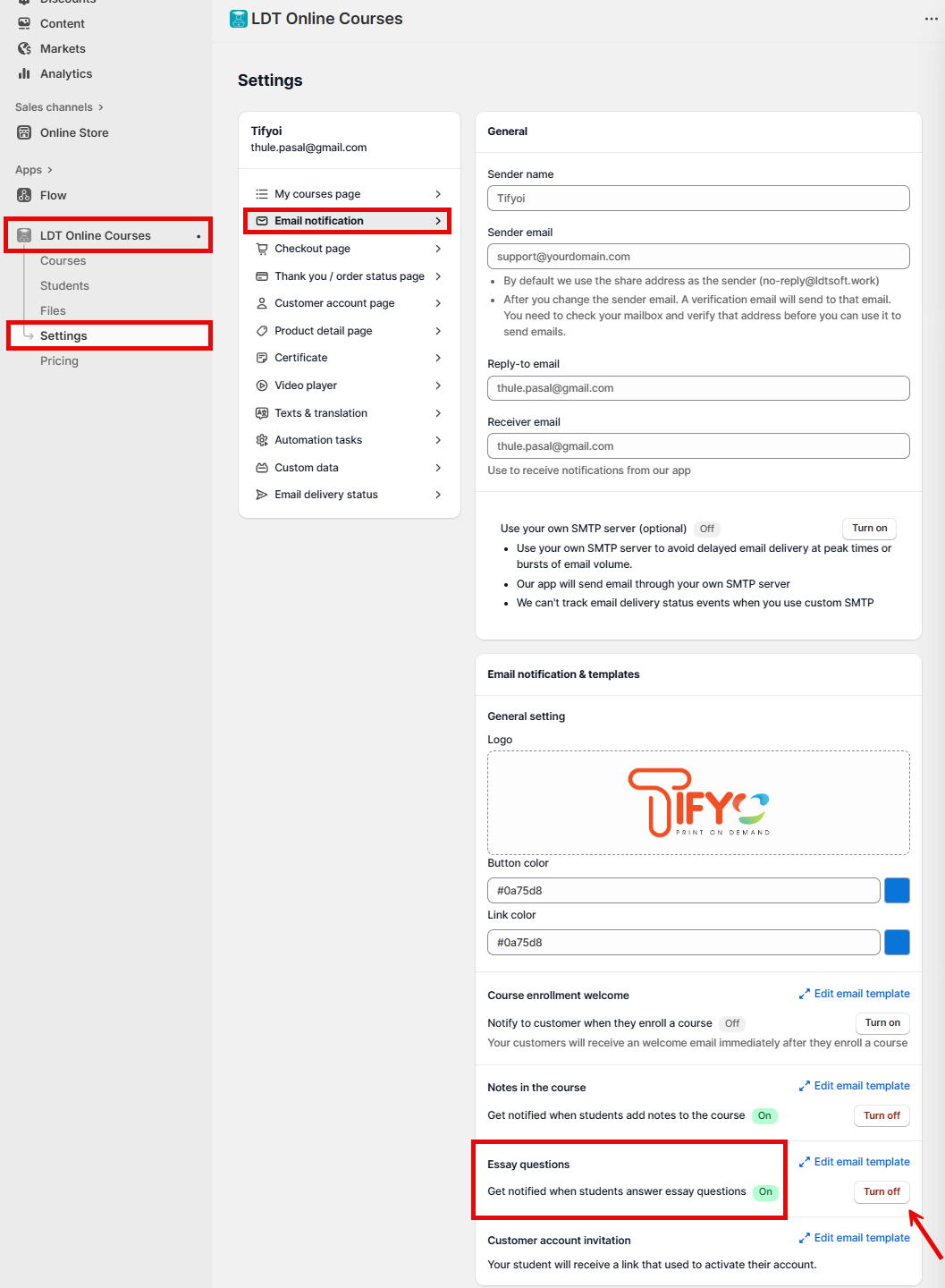
In Shopify admin, open **Apps** -> **LDT Online Courses** -> **Settings** -> **Email notification**, then click **Other email templates**.
### 2. Turn on Essay questions
Find **Essay questions** and switch on **Get notified when students answer essay questions**. If the top bar shows **Unsaved changes**, click **Save**.
### Result
When a student submits an essay answer, the app sends you an email so you can open the quiz and grade it. Multiple-choice quizzes are graded automatically; this notification is for the answers that need you.
### Troubleshooting
* **No email arrives after an essay submission.** Check the switch, the receiver email in **General settings**, and spam; the notification follows the email delivery settings.
* **I get an email for a quiz but cannot find the answer.** Open the quiz in **Quiz & Survey** and use the student's submission; the email is only the alert.
* **Only some essay answers notify.** The notification is sent when the student submits the quiz, not when they start it.
* **I want the student to see a grade.** Grade the essay in the quiz; the completion and result views refresh after grading.
### Related pages
* [How to Review and Grade Student Quizzes and Tests](https://helpdesk.ldtsoft.work/ldt-online-course/quizzes-and-certificates/how-to-review-and-grade-student-quizzes-and-tests.md)
* [How to Get Email Notifications for Student Notes](https://helpdesk.ldtsoft.work/ldt-online-course/emails-and-notifications/how-to-get-email-notifications-for-student-notes.md)
* [How to check email delivery status](https://helpdesk.ldtsoft.work/ldt-online-course/emails-and-notifications/how-to-check-email-delivery-status.md)
* [How to set up in-app notifications](https://helpdesk.ldtsoft.work/ldt-online-course/emails-and-notifications/how-to-set-up-in-app-notifications.md)